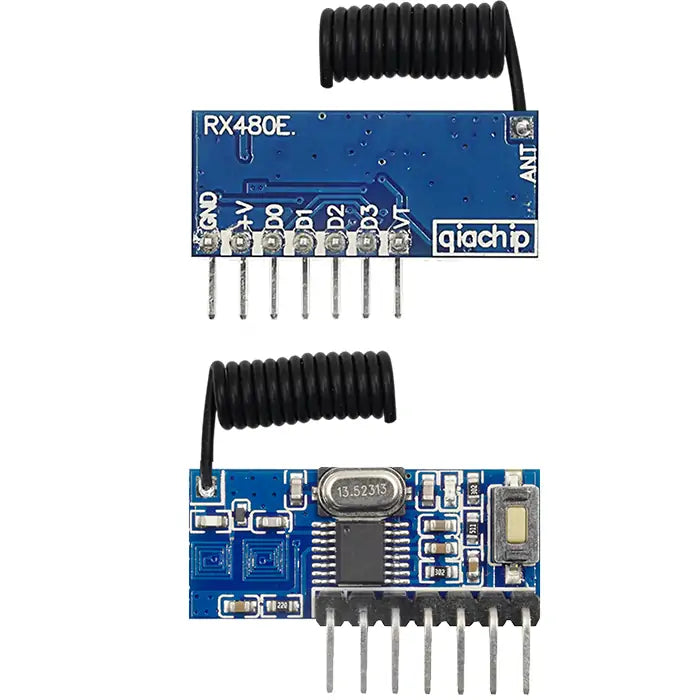
rx480e
RX480E-4C
RX480E-4C
Couldn't load pickup availability
Function description and setting method
(1) Momentary mode; (2) Toggle mode; (3) Latching mode; (4) Reset function;
- The remote control with key value 8421 is used by default for mode setting as described in this manual.
- When using the third working mode, a transmitter with at least two buttons is required.
- Once the receiving module and transmitter are paired and a working mode is set, the receiving module will keep this mode even after power off and power on again.
- The following working modes require the use of QIACHIP brand remote controls (transmitters) and controllers (receiving modules/wireless remote control switches). Compatibility with other brands is not guaranteed.
(1) Momentary mode
In this mode:
- Press and hold the remote control button with key value 8, and the D0 pin on the receiver module will output a high-level signal "1".
- Release the remote control button with key value 8, and the output signal on D0 pin of the receiver module will change to "0".
How to set momentary mode
Step 1
Click the learning button on the receiver module once. The LED indicator on the receiver module will flash and then stay on, indicating that the receiver has entered pairing mode.
Step 2
Press any button on the remote control once. The LED indicator on the receiver module will flash and then turn off, indicating that the momentary mode has been successfully set.
(2) Toggle mode
In this mode:
- Press the remote control button with key value 8 once, and the D0 pin on the receiver module will continuously output a high-level signal "1".
- Press the remote control button with key value 8 again, and the output signal on the D0 pin of the receiver module will change to "0".
How to set toggle mode
Step 1
Click the learning button on the receiver module twice. The LED indicator on the receiver module will flash and then stay on, indicating that the receiver has entered pairing mode.
Step 2
Press any button on the remote control once. The LED indicator on the receiver module will flash continuously and then turn off, indicating that the toggle mode has been successfully set.
(3) Latching mode
In this mode:
- Press the remote control button with key value 8, and pin D0 of the receiver module will continuously output a high-level signal "1".
- Press the remote control button with key value 4, and the output signal of pin D0 of the receiver module will change to "0", then pin D1 of the receiver module will continuously output a high-level signal "1".
How to set latching mode
Step 1
Click the learning button on the receiver module three times. The LED indicator on the receiver module will flash and then stay on, indicating that the receiver has entered pairing mode.
Step 2
Press any button on the remote control once. The LED indicator on the receiver module will flash and then remain on, indicating that the latched mode has been successfully set.
(4) Reset function
When the RX480E-4C receiver module is reset, all paired transmitters will be unpaired and will no longer be able to control the receiver module.
How to reset
Click the learning button on the receiver module 8 times. The indicator light will flash and then will turn off. The reset will be complete.
Share